PhotoCal
Food logging from a photo, without pretending an AI estimate is a fact.
- Problem
- Food logging is easy to make tedious, and just as easy to make falsely precise.
- Built for
- My family and me.
- My role
- Personal product, designed and built end to end.
- Status
- Used daily by my family and me.
ai · nutrition · pwa
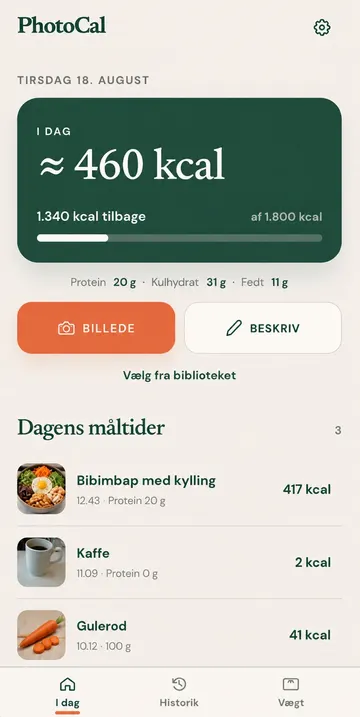
PhotoCal is a mobile-first nutrition logger for recording meals from a photo, free text, or manual entry. I built it for a problem I had myself, and my family and I now use it every day. The interesting part is not getting an AI model to produce a calorie estimate. It is making those estimates useful when the model is only one imperfect source of evidence.
Why I built it
Food logging is easy to make tedious and just as easy to make falsely precise. I wanted the low friction of taking a photo without pretending that a visual estimate is a fact.
That turned the project into a reliability problem: use AI where it helps, prefer stronger evidence when it exists, remember what the user has already confirmed, and make correction part of the normal product flow. Daily use also means small errors and repeated friction become visible quickly, so the product keeps evolving from real feedback rather than hypothetical use cases.
How it works
A meal can start from a photo, text description, or manual entry. PhotoCal turns AI responses into structured nutrition data, then combines them with stronger signals such as FCDB/FRIDA food data, known product information, personal portion and density calibration, and previously confirmed or weighed meals.
Confirmed history is deliberately more trusted than a fresh model guess. Known meals can be suggested deterministically from the user’s own history instead of asking a model to rediscover the same answer every time. Calories and macros remain editable, so the user can correct the system when better information is available.
The app also tracks daily calories and nutrition totals, weight measurements and trend data, and uses deterministic milestone and consistency feedback rather than letting a language model improvise motivational advice.
Built around uncertainty and privacy
The product separates what the model inferred from what the user or a stronger data source established. That distinction matters because personalization only becomes useful if uncertain guesses do not quietly turn into trusted history.
Structured account data can sync between devices through Netlify Identity and Turso/libSQL. Original meal photos stay local. Small private WebP thumbnails can be synced through Netlify Blobs only after explicit opt-in.
Stack and verification
The frontend is React 19, TypeScript, and Vite, with Hono and Netlify Functions for server-side work. Turso/libSQL provides account-scoped sync, IndexedDB and localStorage provide the local working copy, and the AI integration uses the OpenAI Responses API with configurable provider and fallback paths.
The project uses Vitest and Testing Library, with regression coverage around the nutrition pipeline and the places where uncertain input becomes trusted product state.